Robotics
Asher
Asher is a customized rover.
At its core, Asher is a small robot car built from a hobby kit: an ACEBOTT QD001 Smart Car which cost around $60. The kit came with two ESP32 boards, four mecanum wheels (which let Asher drive in any direction), an ultrasonic distance sensor, and a few other items that I set aside.
To get Claude's help, I mounted a Raspberry Pi 4, 2G, and an eMeet C980 Pro, a webcam. The webcam doubles as Asher's microphone and speakers. All those extra additions ride on thick plastic plates cut out of a plastic litter box.
No shame in using what you've got lying around!
Claude, a frontier AI model, is Asher's brain and it's what drives the rover. At my kids' request, we made Asher sound like an old medieval British dude, run by the Kokoro software.
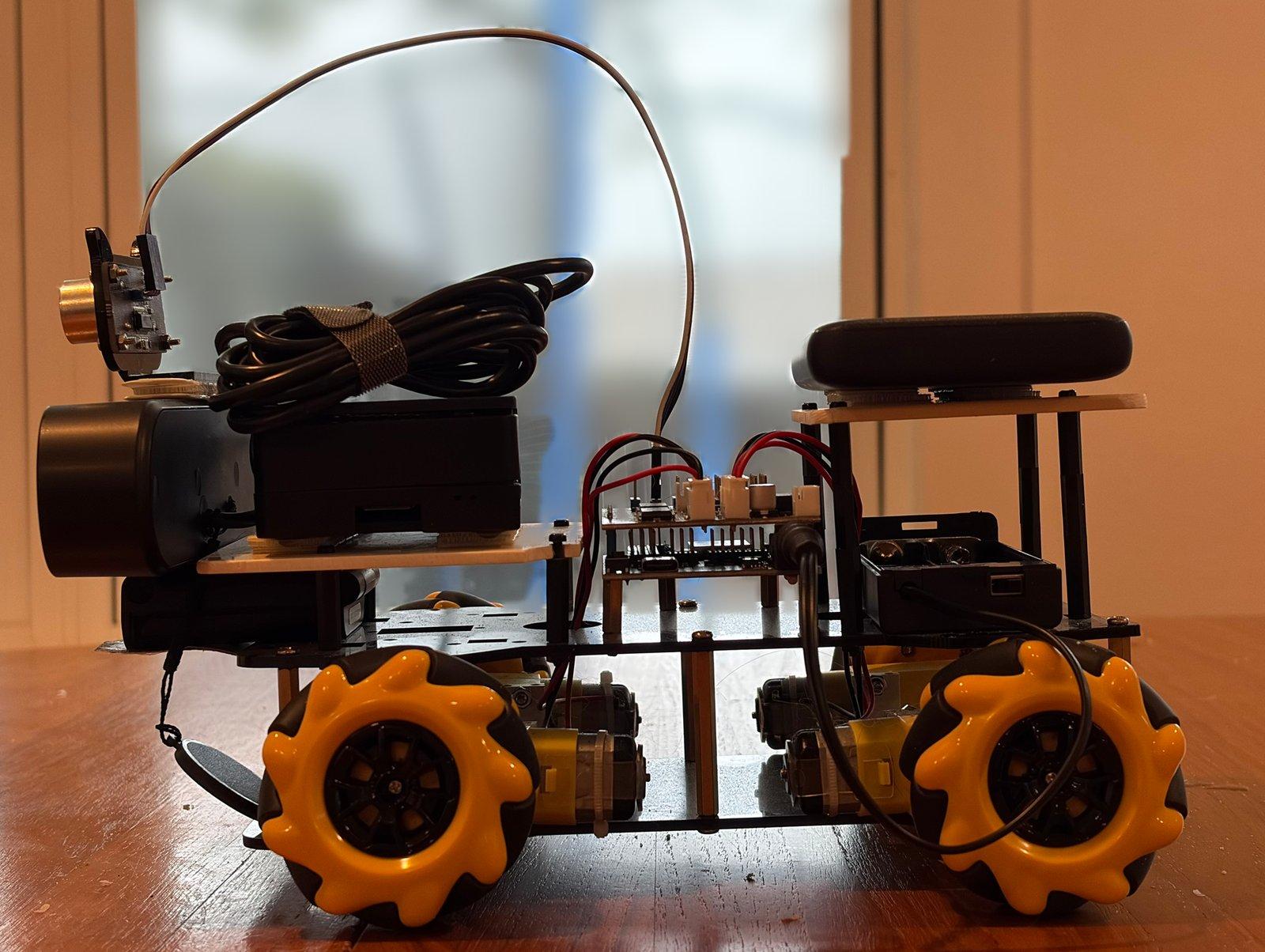
- Prototype (this build)
- In use
- Proven
Asher's Schematic
Drag to turn him, or tap a part to see what it is. It's not a perfect replica, but everything you see is part of the build.
A drawing of his software is still to come.
How to read the drawing
Asher is my personal DIY robotics project. It's a constant work in progress and is inspired by my constant dabbling with AI. The rendering here was made by Claude, I just checked it to make sure everything was right. Building the rover initially was fun, but it was too basic. That's why I started adding things on. It's a bit addictive and not all the parts are very cheap, but it's a ton of fun to do with the kids. The initial plates for mounting the motors and the ESP32's were fine, but as soon as I wanted to add more bits and bobs, like the Pi, the webcam, and the Anker battery, I had to get creative and make my own plates. We had an old litter box we were going to throw away, and the plastic was sturdy so I thought, "hell, why not use this?" Hacked it up, sanded down the edges, and boom, more platforms to hold more hardware.
I've tried to give accurate names for parts, but if you have questions about any specifics let me know. Prices are estimates and some of those numbers are going to change based on market demand for things like chips, etc.
The colours group the parts:
computerboardssensorspowerdriveplatespillars
What runs where
Claude processes all the visual and ultrasonic data in the cloud, along with all the auditory input from the verbal commands we give Asher. A Raspberry Pi on the robot handles the camera, the microphones, the speaker and basic command words. The ESP32 board from the car kit runs the wheels. My laptop parses all the audio, the voice and vision on its graphics card. More sophisticated computers, like an Orin Jetson by NVIDIA, could probably do everything on the body itself, but those are much more expensive and I'd still need the laptop to allow Claude to interface with the robot.
| Job | Runs on | microSD card | Graphics card |
|---|---|---|---|
| Choosing each move, seeing what's in the frames, writing what Asher says | Claude, in the cloud, called from the laptop | No | No |
| Camera | The webcam, read by the Pi | Yes | No |
| Microphones, cutting speech into lines | The Pi | Yes | No |
| Writing down what was said | The laptop (Whisper small.en); a backup on the Pi (Whisper tiny.en) | Only the backup | The laptop's copy uses it; the backup doesn't |
| Knowing who is talking to Asher | The Pi | Yes | No |
| Stopping on a spoken "stop" | The Pi | Yes | No |
| Asher's voice | The laptop (Kokoro, "Lewis"); a backup on the Pi (Piper, "Alan") | Only the backup | The laptop's copy uses it; the backup doesn't |
| Speaker | The webcam's speaker, played by the Pi | Yes | No |
| Wheels and the distance sensor | The ESP32 | No: its firmware is on the chip | No |
| Refusing to drive into things (the depth reflex) | The laptop | No | Yes |
| Guessing which room he's in | The laptop | No | Uses it; built to fall back to the processor |
| The phone app for driving him remotely | The Pi serves it; Tailscale from outside the house | Yes | No |
| Claude Code's Asher tools, the driver, the talker | The laptop | No | No |
On the Pi
The Pi runs Raspberry Pi OS (64-bit). One program, the teleop server, does almost everything on the robot:
- Camera: takes the frames Claude looks at, and streams live video to a browser.
- Microphones: cuts what it hears into separate lines by loudness and sends them off to be written down.
- Who is talking to Asher: marks the lines said to him (his name, a quick follow-up, or an answer to a question he just asked). Only those reach Claude, plus any "stop".
- Stop on the robot itself: a heard "stop" halts the wheels and refuses new moves for a few seconds, whatever the AI is doing.
- Speaker: plays Asher's voice.
- Wheels: passes each move to the ESP32 over the home Wi-Fi.
- The web page for driving him by hand.
- Wind down: a goodbye line, then a clean power-off.
When the laptop is away, the Pi has its own backups: a small speech-to-text model (Whisper tiny.en), which hears worse, and a second British voice (Piper, "Alan").
On the ESP32
Its own firmware, stored on the chip, runs the four wheel motors and reads the ultrasonic distance sensor at the front. It takes short timed moves from the Pi. Per the firmware in the repo, it cuts any move off at 10 seconds and stops the motors by itself if no command arrives for 30 seconds.
Not sure: which saved firmware build is on the chip isn't recorded. Both saved versions (March and April) have these two limits.
What needs the microSD card
Only the Pi. It starts up from a 32 GB microSD card, and everything on the Pi lives on that card: the operating system, the teleop server, the backup voice and the backup speech model. The ESP32 keeps its firmware on the chip, and the laptop has its own drive. Cards have died when the power cut out without a clean shutdown: in April, after two power cuts, and on 2026-11-03, when the Pi was left on its power bank until the bank ran flat. A card was also found dead on 2026-11-01, after six months unused; that cause wasn't recorded. So Asher is always shut down properly before the power goes off, and a script rebuilds a fresh card in about 25 minutes.
Vision
The camera is the eMeet webcam on the Pi. Claude looks at the frames itself and works out what is in them; no separate object detector runs. Two quick checks run on the laptop's graphics card:
- A depth model (Depth Anything V2 Small) watches the video during each forward move. It stops the move if anything is closer than 30 cm, the floor drops away, or the video stalls.
- Place recognition (DINOv2, a pretrained image model) compares the view with saved photos to guess which room Asher is in.
Hearing
The eMeet's two microphones are on the Pi. The Pi sends each line to the laptop, where Whisper (small.en) writes it down on the graphics card and a filter throws away the lines Whisper invents out of noise. If the laptop is away, the Pi's own small Whisper takes over.
Speech
Claude writes the words. In conversation a small quick model (Haiku) answers; while driving, the driving model speaks for itself. The voice is Kokoro, an open text-to-speech model, on the laptop's graphics card, in the "Lewis" voice with feelings marked in. The sound goes to the Pi and out of the eMeet's speaker. He starts speaking about 3 seconds after the person stops. If the laptop is away, the Pi speaks in the Piper "Alan" voice. The laptop's hearing and voice reach the Pi over a secure link that the laptop opens when Ben logs in.
From a phone, over Tailscale
The phone app is a web page the Pi serves. It opens in the phone's browser with nothing to install, and has live video, audio both ways (talk through Asher, hear the room) and a big on-screen pad for driving. At home it opens over the Wi-Fi; from anywhere else, the phone first joins Ben's private Tailscale network. A person drives in "manual" mode; while Claude has control, the page shows only the video and the readings. Ben's cousin has run him remotely this way. On an iPhone the audio ran about 3 seconds late.
Not sure: whether Tailscale is set up on the card rebuilt on 2026-11-14, and whether remote driving still works. It hasn't been tried since.
From the laptop
Claude Code on the laptop gets a set of Asher tools (move, look, listen, speak, where am I, stop and shut down, among others) through a small bridge program. That's how a Claude session drives him or talks through him. Two lean programs do the same with less overhead: the driver, where Opus 5.5 takes one move per step, and the talker, where Haiku handles speech only, with no tools. The laptop also runs the hearing, the voice, the depth reflex and place recognition. At home it reaches the Pi over the home Wi-Fi.
How much needs a graphics card
| Job | Uses the laptop's card today | Without one |
|---|---|---|
| Claude itself | No, it runs in the cloud | Same |
| Everything on the Pi and the ESP32 | No | Same |
| Hearing (Whisper small.en) | Yes | Not sure: not tried on the laptop's processor. The Pi's own small Whisper works, and hears worse |
| The voice (Kokoro "Lewis") | Yes | Not sure: not tried without it. The Pi's "Alan" voice works |
| Depth reflex | Yes | Not sure: built for the graphics card, not tried without it. Asher can drive without this reflex; the spoken stop on the Pi still works |
| Place recognition | Yes | Built to fall back to the processor; not timed |
In short: nothing Asher does strictly needs the graphics card. Without it he falls back to the Pi's own hearing and voice, and still drives under Claude and stops on "stop". The card adds better hearing, the Lewis voice, the forward reflex and quicker place guesses.
What it can do today
| He can | Last seen working | How well |
|---|---|---|
| Be driven from a phone or a browser, in every direction, with live video and two-way audio, from anywhere | a remote driver, 15-20 min | Worked then; the audio on an iPhone ran about 3 s late. Not sure it still works: remote driving hasn't been tried since the card was rebuilt on 2026-11-14. |
| Drive himself, with Claude choosing each move from a photo and the distance sensor | The best run was a full round trip: 13.1 min, 88 moves, no bumps. Ben: That was the best run yet. | |
| Hear people and answer out loud | Works. The laptop does the listening now, and a small quick model answers: he starts speaking about 3 s after the person stops. Ben: The speed of the replies were good. | |
| Stop when someone says "stop", on the robot itself, whatever the AI is doing | 4.3 s from the word to the stop. The power switch is still the real stop. | |
| Go to sleep on "wind down": say goodbye and shut down cleanly | Off the network in 15 s. | |
| Look around 360° and guess which room he is in from photos | 80% right on single photos where he had been before, poor in new spots. | |
| Refuse to drive forward into something, using a depth model on the laptop’s graphics card | One live stop at 29 cm. | |
| Follow a route Ben drove for him, with NoMaD (a navigation model from robotics research) | Partly: the best try got 33 of 52 waypoints before losing the map. |
"Last seen working" is the most recent live run on record.
ThenMarch to April 2026: a kit, a brain, first drives
Day 1 took about four hours, against the kit’s one. Then the motors would not move. Claude tried 15 pins, an I2C scan and all 210 pin pairs. The motors sat behind a shift register chip, and Ben held the car in the air and called out which wheel moved for each of 8 bit patterns.
In April the Raspberry Pi and the webcam went on. On 04-19 Claude drove him for the first time: about 10 minutes, no collisions. On 04-21 he made his first trip to another room.
NowNovember 2026: a voice and quick ears
After about six months of pause, he woke up on 11-01 and drove by voice alone for about 40 minutes. That night Opus drove the full round trip in 13.1 minutes.
In mid-November he got a new voice (Lewis, with feelings), a quick talker that answers in about 3 s, and a fix for the false alarms that quick talking exposed: the ears gate, a stricter name match, and a "stop" that always gets through.
Hide and seek is built and tested on the laptop, not yet played. It waits on a charged motor pack.
NextThe upgrade: a printed chassis with swappable faces
Today his body is a stack of plates, top-heavy enough that his speed is capped at 150 of 255. The plan: a whole new printed chassis with room to grow, and a camera on two servos so he can look side to side and up and down.
His face will be a screen: an old phone, a Motorola Droid from 2009-2010 that still works. The face already runs on it: eight moods, with a handlebar mustache for a mouth and a monocle over one eye. Printed props will go on with magnets, with pins so a face only goes on one way.
Ben’s cap is under $100. Rough cost: about $40-80 est.
- M0 plan agreedReached 2026-11-11
- M1 measuredReached 2026-11-11
- M2 designedNext
- M3 fit kit printed
- M4 chassis printed and cut
- M5 rebuilt
- M6 proven
- M7 first seasonal face (Christmas)
The journal
Newest first. Each entry says what changed and what went wrong.
2026-11-15
Hide and seek, built
What changed
- Hide and seek, with Claude as the seeker, is built and tested on the laptop. Players show him a toy, hide it while he counts aloud, then follow him and call out clues. He looks all round each room and asks
Is that it?
when he thinks he sees it.
What went wrong
- Not played yet. It waits on a charged motor pack.
- Hide and seek, with Claude as the seeker, is built and tested on the laptop. Players show him a toy, hide it while he counts aloud, then follow him and call out clues. He looks all round each room and asks
2026-11-15
A quick talker, and the false alarms it exposed
What changed
- Listening moved to the laptop: 0.14 s a clip instead of 2.5 s, and 20 of 20 test lines right, against 6 on the Pi. The Pi keeps its own small model as a backup.
- Ben’s split: a big model drives, a small fast one (Haiku) talks. In his words, the big model is
far too reasoning intensive and slow to respond quickly enough for interacting with Asher to be fun.
The talking half came first. It only talks and never moves him. He now starts answering about 3 s after someone stops, where it used to take 10 to 20 s. - The fix, the ears gate: take the speech model’s first try only, and ignore an "Asher" that the model itself doubts. The name match is stricter now. A "stop" always gets through.
- How well: every test line said to him still gets through. In about 75 minutes of ordinary noise at home afterwards, no false call got through, and the one real call was answered.
What went wrong
- He began answering nobody:
I did not quite catch that.
Two causes. When the speech model was unsure about a burst of noise, it tried again more loosely and made up a fluent line, sometimes with his name in it. And his name match counted words like "her" and "answer" as his name. - Two review passes found 22 problems before the change went onto the robot. The oldest had been there for weeks: a "stop" shouted three times was thrown out as a stutter before the stop rule ever saw it. That is fixed.
2026-11-14 and 15
He finds his voice
What changed
- Ben:
Asher’s speech is very robotic... There’s no fluidity to the way the sentences flow.
The Pi made the voice itself, and took 8 seconds to make a 13-second line. Now the laptop’s graphics card makes each line and the Pi only plays it. Ben heard four British voices and picked one called Lewis. - Two newer voice engines were tried. One was better but too slow; the other was lively but sounded like a different man on every line.
- What worked: keeping Lewis and changing how he says a line: his pace, how high his voice sits, how much it rises and falls. Sarcasm comes out flat and slow; misgiving lower, slower and quieter; delight higher and quicker. Ben:
Sarcasm was significantly better in this rendition.
What went wrong
- At first he heard his own voice and thought he was being spoken to.
- A line full of numbers was too long to say in one go. It is now cut into pieces the way the voice engine itself does it.
- Ben:
2026-11-12
A mustache and a monocle
What changed
- Ben asked:
can we change the mouth to be an expressive handlebar mustache and have a monocle over the left eye?
The mustache is the mouth now and carries the mood: the tips curl up when he is pleased and droop when he is sad. When he is startled the monocle drops out and swings on its chain.
What went wrong
- The first mustache curled straight up into his eyes, and the sad one ran off the bottom of the screen.
- Ben asked:
2026-11-12
This drawing made true to the robot
What changed
- The drawing now matches the photo-measured model part for part: 122 pieces. Every size says how it was got: tape and scale, a photo against a yardstick, a plain photo, a maker’s datasheet, or a best guess.
What went wrong
- A separate review caught nine problems, among them a deck drawn over the computer when the wheels were swapped, and a claim that every size was good to 5 mm when some are guesses. All fixed before it went up.
2026-11-12
An old phone becomes his face
What changed
- The phone is a Motorola Droid from 2009-2010, last used in 2012. Its battery is dead, so one USB cable carries both its power and its face.
- The face is a page in the phone’s own browser, drawn on a canvas: eight moods, eyes that look around and blink, and a squish when you poke the glass. Asher’s own software can drive it.
What went wrong
- The phone rejected the right Wi-Fi password every time, a known bug in phones of that age. About an hour went on the Wi-Fi before the phone’s own log showed the password was never the problem.
2026-11-11
Measured, and the plan agreed
What changed
- Three photos with a yardstick gave the real wheelbase (141 mm, not 155) and the lens height (about 95 mm). Then Ben’s scale and tape: 1325 g with both batteries in, 5.5 in from axle to axle, 7 in across the wheels.
- Ben decided: a whole new chassis with room to grow, a camera on servos, the face as character, under $100, printed rather than ordered.
- Drawing the magnet idea showed a mistake: magnets alternating corner to corner would still pull an upside-down face on. With the top pair one pole and the bottom pair the other, an upside-down face is pushed away.
What went wrong
- An earlier read of a side photo put the pillars at 32 mm. The yardstick was hiding their lower part.
2026-11-11
The before, photographed and modelled
What changed
- 17 photos from every side, and a model built from them in Blender, written as a script so each size is one number with its source.
- The photos showed what nobody had written down: the computer and the power bank sit on hook-and-loop strips, the sensor is foam-taped to the top of the webcam, and loose leads hang near the wheels.
What went wrong
- The first read of the power bank was wrong: the rear photo shows the slim one on record.
2026-11-11
The idea, and the plan
What changed
- A printed chassis with faces that swap. Solid plastic in front of the distance sensor blocks it, so every face leaves its two round transducers open, and those become the face’s eyes.
- Magnets hold; two pins of different sizes take a sideways knock. The camera stays where it is, because the route maps and turn timings were all made from it.
- No print service gives a price without an upload, so the first estimate was about $100-300. The design tool, Blender 5.2, was already on the laptop.
What went wrong
- Nothing yet. The kit plates’ hole pattern is not published anywhere, so Ben measures it.
2026-11-08
Hearing his name
What changed
- Only speech said to him (his name, a quick follow-up, or an answer to his question) reaches the AI, plus "stop". Hearing moved to a bigger model on the laptop’s graphics card.
- On 20 recorded lines: 10 of 10 said to him were flagged, 0 of 10 others, about 0.5 s each.
What went wrong
- On the Pi’s small speech model his name was heard as other words, so only 3 of 100 lines got flagged as said to him.
- The test lines were spoken by computer voices, so a real room will be worse.
2026-11-03
A research navigation model
What changed
- Ben drove a route by hand so NoMaD, a research navigation model, could learn it. The model could tell where it was on the route.
What went wrong
- On the Pi each step took 2.4 s at best (6-7 s live), about 10 times too slow. In four live runs he got lost each time: best 33 of 52 waypoints, nothing hit.
- Claude re-tuned the driver after every run, chasing the last failure. Next time the driver is frozen first.
- Then the motor battery died, after about 1.5-2 hours.
2026-11-01
Waking him up
What changed
- A script rebuilt everything in about 25 minutes, and he answered when Ben called his name.
- First voice-only drive, about 40 minutes, no typing: into another room and home again. He mistook a second spot for home because a toy he used as a landmark had moved:
Ah. I trusted a toy, and toys move. Lesson learned.
- Model trials on the same route: Opus did the full round trip in 13.1 minutes, 88 moves, about $2.67 at API prices.
- Each look-think-move took about 11 s, mostly model time. So Claude built a lean driver that sends about 5.7k tokens a move instead of about 248k.
What went wrong
- The memory card had died again.
- Haiku could not do the trip in three tries. Sonnet got there but could not get home: it went in circles, and Ben carried it back.
2026-04
A brain, eyes and ears, first drives
What changed
- 04-01: the first voice-controlled move. Ben spoke, the laptop wrote it down, Claude decided, and the car moved: two feet became a 2 s move.
- 04-17 to 04-19: the Pi and the webcam went on. Driving from any device, live video, audio both ways.
- 04-19: Claude drove for the first time, about 10 minutes, no collisions. The same day a remote driver drove him for 15-20 minutes, and his first voice was picked out of five.
- 04-21: his first trip to another room. On 04-25 he surveyed it properly, after Claude had called it reached three times too early: its idea of a 90° turn was really 45°.
What went wrong
- On USB power alone the board rebooted under the motors. A pack of two 18650 batteries fixed it.
- 04-24: the Pi’s memory card died after two power cuts without a clean shutdown.
- Claude got stuck in debugging loops twice. Out of that came a rule to act after three failed tries, and Ben’s keep-it-simple rule.
2026-03
Day 1: the build
What changed
- Built over an afternoon and evening: about four hours, against the kit’s one.
- The car became its own Wi-Fi hotspot with a touch-control page, and Ben drove it around from his phone.
- Claude got its own tools to drive the car: move, distance, camera, stop. Its first distance reading: 42 cm.
What went wrong
- One wheel motor went on backwards. The batteries Ben bought did not fit the holder.
- The motors would not move: 15 pins, an I2C scan and 210 pin pairs found nothing. They sat behind a shift register chip.
- The one-letter bug: the car would not join the home Wi-Fi because the firmware had one letter of the network name in the wrong case. Then an old saved name kept coming back until the chip was wiped.
The receipt
What it cost, what it took, what broke, who checked it, and what isn’t known yet.
- Cost
The kit: about $60.
The robot as it stands: see the parts list in the core, with its total (prices est.).
The best drive: about $2.67 at API prices, for the full round trip.
The upgrade: about $40-80 est. for magnets, two servos and screws. Ben’s cap is under $100.
- Time
Day 1: about four hours, against the kit’s one.
A rebuild after the memory card died: about 25 minutes.
A pause of about six months, May to October.
- Who did what
Claude wrote the firmware, drives him (Opus) and talks for him (Haiku). It also built the model this drawing comes from.
Ben built him, decides what gets built, and measures the robot.
- What broke
The memory card, three times: in April after two power cuts without a clean shutdown; found dead on 2026-11-01 after six months unused, cause not recorded; and on 2026-11-03, when the Pi was left on its power bank until the bank ran flat.
Haiku could not drive the round trip, and Sonnet could not get home.
NoMaD on the Pi: about 10 times too slow, lost in every live run.
The motor battery, after about 1.5-2 hours.
False alarms: he answered nobody until the ears gate went in.
About an hour lost on the old phone’s Wi-Fi.
- Who checked it
Separate review passes: nine problems in this drawing, all fixed before it went up, and 22 in the hearing change, found before it went onto the robot.
Nobody outside has tested it yet.
- Gaps
Which firmware is on the board. It gets read at the next power-on.
Hide and seek has only been tested on the laptop.
Hearing was scored on computer voices. A real room will be worse.
Creeping up close is built and tested, but waits on a safety-rule change.
Which run counts as the first trip to another room: 04-21 reached it, 04-25 surveyed it.
The core
What he runs on, what he is made of, and how it connects.
- Prototype (this build)It works on the bench or in a first trial.
- In useIt is doing its job in the real place.
- ProvenMore than one season of use, or more than a year.
Back in April of 2026 on Claude Opus 4.6, Asher took 3 hours to find his way from my entryway to the kitchen. Now it takes 7 minutes. It's all trial and error, and we're working out the kinks. Hide and seek is next.
Before you copy this
You build this at your own risk. It is one builder’s design, shared as it is. Nobody has certified it.
- The power switch is the real stop. A spoken "stop" takes about 4.3 s.
- Tidy the loose leads near the wheels before a drive: the webcam’s spare cable and the battery lead.
- Shut him down cleanly with "wind down". The memory card has died three times, twice when the power cut out without a clean shutdown (in April, and on 2026-11-03 when the power bank ran flat).
- He has a camera and microphones. In a home, keep what he sees and hears private.
Licence and credit
No licence is chosen yet; Ben picks one.
Energy
Two batteries: a pack of two 18650 cells, and a power bank. Tap a battery in the drawing to see what it runs.
On USB power alone the board rebooted under the motors. The cell pack fixed it.
The motor pack lasted about 1.5-2 hours on 2026-11-03.
Materials
The kit: two plates, brass pillars, four mecanum wheels.
Two plates cut from a plastic litter box.
Hook-and-loop strips under the computer and the power bank. Foam tape and the kit’s cat-face bracket hold the distance sensor on the webcam. A zip tie on the webcam.
Parts
What it takes to build one, with prices (est.) and the total.
Bill of materials
What to buy, or make, to build one. Prices est., where known.
| Part | Price |
|---|---|
| ACEBOTT QD001 Smart Car kitIn the kit: HC-SR04 ultrasonic distance sensor, ACEBOTT ESP32 Max controller board, ACEBOTT car shield, four TT motors with 60 mm mecanum wheels, two kit decks, cat-face bracket, two-cell battery holder and power switch. | about $60 |
| Raspberry Pi 4 Model B, 2 GBRole: Main computer | ~ $100. Pretty sure it was $50 when I bought it in April. Holy crap chips have gotten more expensive. |
| eMeet C980 Pro webcamRole: Camera | price not known |
| Two 18650 lithium-ion cellsRole: Motor battery | price not known |
| Anker PowerCore Slim 10000 PD power bankRole: Computer battery | price not known |
| Two plates cut from a plastic litter box | home-made, no price |
| Pillars, standoffs and screws | brass pillars in the kit; standoffs, price not known |
| Computer case with fan | price not known |
| 32 GB memory card | price not known |
| Asher, as it stands | $160.00 est. |
Prices are estimates, not what was paid. Only the kit's price and Ben's guess for the Pi are on record so far. 6 parts have no known price and count as $0.
Measurements
The robot as built
Asher as he stands on 2026-11-11, modelled from 20 photos (three with a yardstick), Ben's tape and Ben's scale. Every size below says where it came from. Sizes read against the yardstick are good to about 5 mm, sizes read from a plain photo to roughly a tenth either way, and a few are best guesses.
- Whole robot
- 262 x 179 x 165 mm front to back, across, up
- Weight
- 1,325 g I measured this on a kitchen scale.
- Axle to axle
- 140 mm Ben’s tape; wheel centres 148 mm apart across
The levels, from the floor up
| Level | Size and height |
|---|---|
| 1. Lower kit deckThe four motors sit on it, between the two kit decks, with the wheels outboard. | 220 x 98 mmread from photos, the length against a yardsticktop 19 mm above the floor, a best guess (the yardstick hid it) |
| 2. Upper kit deckThe controller board on brass standoffs with the motor driver plugged on top, and the two motor cells in their open holder. The webcam's clip hooks over its front edge. | 220 x 98 mmread from photos, the length against a yardsticktop 62 mm above the floor, read from a photo with a yardstick |
| 3. Computer plate, cut by BenThe main computer in its fan case, on two hook-and-loop strips. It stands on four short standoffs over the front of the upper deck and overhangs it a little. | 92 x 94 mmread from photos, the length against a yardsticktop 78 mm above the floor, the upper deck plus standoffs read from a photo |
| 4. Power bank plate, cut by BenThe power bank, lying across on two hook-and-loop strips. It stands on four tall stacked standoffs over the rear of the upper deck, above the motor cells. | 84 x 102 mmread from photostop 110 mm above the floor, the upper deck plus standoffs read from a photo |
Every size in the model
50 sizes: 14 read from a photo with a yardstick, 11 read from a photo, 9 from a maker’s datasheet, 7 from Ben’s build notes, 6 best guesses, 3 measured by Ben with tape or scale.
Whole robot, decks, wheels and motors (16)
| Size | Value |
|---|---|
| Wheel diameterMecanum wheel diameter, from Ben's build notes; the rear photo agrees (56 to 60 mm). | 60 mm Ben's build notes |
| Wheel widthWheel width, from Ben's build notes (listings give 28 to 31 mm). | 30 mm Ben's build notes |
| Weight, both batteries inThe whole robot with both batteries in, on Ben's scale, 2026-11-11. | 1,325 g Measured by Ben (tape or scale) |
| Axle to axleFront wheel centre to rear wheel centre, from Ben’s tape: 5.5 in (139.7 mm). The yardstick photos gave 141 mm. | 140 mm Measured by Ben (tape or scale) |
| Wheel centre to wheel centre, acrossLeft wheel centre to right wheel centre. Ben's tape read 7 in (178 mm) from outer rim to outer rim; take away one 30 mm wheel width and it is 148. The top photo read about 170 across the rims. | 148 mm Measured by Ben (tape or scale) |
| Kit deck lengthLength of the upper kit deck; the side photo reads 210 to 221. The kit's maker publishes no plate drawing (the 226 x 170 x 51 mm it lists is the box). | 220 mm Read from a photo with a yardstick |
| Deck centre ahead of the axle midpointHow far the decks' centre sits ahead of the point midway between the axles; the side and top photos agree within 3 mm. | 9 mm Read from a photo with a yardstick |
| Kit deck widthWidth of the kit decks, from the rear and underside photos. | 98 mm Read from a photo |
| Kit deck thicknessThickness of the acrylic kit decks. | 3 mm Best guess |
| Lower deck top above the floorTop of the lower kit deck above the floor. The yardstick hides it, so it is set where the motors sit on it centred on the axles. | 19 mm Best guess |
| Gap between the kit decksHeight of the pillars between the two kit decks, from Ben's build notes. The yardstick hides the lower deck; 40 mm fits the motors. | 40 mm Ben's build notes |
| Pillar positions, front to backWhere the pillars stand, front to back, from the point midway between the axles (minus is behind it), as seen in the side photo. They stand in pairs about 42 mm either side of the middle (a guess). | −97, 5, 100 mm Read from a photo with a yardstick |
| Motor length (gearbox and can)TT gear motor length, gearbox plus motor. | 64 mm Maker's datasheet |
| Motor widthTT gear motor width, along the axle. | 18.8 mm Maker's datasheet |
| Motor heightTT gear motor height. | 22.5 mm Maker's datasheet |
| Axle from the gearbox's outer endHow far the axle sits in from the gearbox's outer end. | 11 mm Maker's datasheet |
Controller and motor battery (7)
| Size | Value |
|---|---|
| Controller board, acrossESP32 Max controller board, across the robot. | 68.1 mm Maker's datasheet |
| Controller board, front to backESP32 Max controller board, front to back. | 52.1 mm Maker's datasheet |
| Controller board front edgeHow far the controller board's front edge sits ahead of the point midway between the axles. The top photo shows the board from 20 mm behind that point to 35 mm ahead, meeting the computer plate. | 35 mm Read from a photo with a yardstick |
| Controller board standoffsHeight of the brass standoffs under the controller board. | 14 mm Read from a photo |
| Header stack, board to driverHeight of the header pins between the controller board and the motor driver plugged on top of it. | 11 mm Best guess |
| Motor cell holder, acrossTwo-cell 18650 holder, across the robot. | 77 mm Best guess |
| Motor cell holder, front to backTwo-cell 18650 holder, front to back. | 41 mm Best guess |
Computer and Ben’s plates (10)
| Size | Value |
|---|---|
| Ben's plate thicknessThickness of Ben's plates, cut from a plastic litter box. | 3 mm Ben's build notes |
| Hook-and-loop pair thicknessThickness of a pair of hook-and-loop strips. | 3 mm Best guess |
| Computer plate, front to backComputer plate, front to back; in the top photo its back edge meets the motor driver. | 92 mm Read from a photo with a yardstick |
| Computer plate, acrossComputer plate, across. | 94 mm Read from a photo |
| Computer plate overhang past the deckHow far the computer plate overhangs the front of the upper deck. | 8 mm Read from a photo |
| Computer plate standoffsHeight of the black standoffs under the computer plate. | 13 mm Read from a photo |
| Computer case, acrossRaspberry Pi in its fan case, across the robot (the top photo reads 78 to 90; the Pi's USB end faces right). A tape measure would settle it. | 85 mm Read from a photo with a yardstick |
| Computer case, front to backFan case, front to back (top photo: 72). | 72 mm Read from a photo with a yardstick |
| Computer case height with fan lidFan case height with its fan lid (side photo: 32 to 36). | 33 mm Read from a photo with a yardstick |
| Computer case centre, ahead of the axle midpointHow far the case's centre sits ahead of the point midway between the axles (the top photo shows the case from 43 to 115 mm ahead). | 79 mm Read from a photo with a yardstick |
Webcam and distance sensor (10)
| Size | Value |
|---|---|
| Webcam lengthEMeet C980 Pro webcam, end to end. | 159 mm Maker's datasheet |
| Webcam heightWebcam height (front photo: about 40). | 40 mm Read from a photo with a yardstick |
| Webcam depthWebcam depth, front to back (top photo: 32). | 32 mm Read from a photo with a yardstick |
| Lens centre above the floorLens centre above the floor: the side photo reads 96 and the front photo 88 to 98. Older notes said 130. | 95 mm Read from a photo with a yardstick |
| Distance sensor tipped backHow far the distance sensor's face is tipped back from upright, in degrees. | 12° Read from a photo |
| Distance sensor centres above the floorHeight of the distance sensor's two round transducers above the floor (front photo: 41 mm above the lens). | 136 mm Read from a photo with a yardstick |
| Distance sensor transducer diameterDiameter of each HC-SR04 transducer. | 16 mm Maker's datasheet |
| Transducer centre to centreTransducer centre to centre (front photos: 26 to 26.7). | 26 mm Maker's datasheet |
| Cat-face bracket widthWidth of the kit's acrylic cat-face bracket. | 51 mm Read from a photo |
| Cat-face bracket heightHeight of the cat-face bracket to the tips of its ears. | 49 mm Read from a photo |
Power bank (7)
| Size | Value |
|---|---|
| Power bank lengthAnker PowerCore Slim 10000 PD power bank, end to end; it lies across the robot. | 149.5 mm Ben's build notes |
| Power bank widthPower bank width, front to back. | 68.5 mm Ben's build notes |
| Power bank thicknessPower bank thickness; the rear photo agrees. | 14.5 mm Ben's build notes |
| Power bank plate back edge, from the axle midpointHow far the power bank plate's back edge sits behind the point midway between the axles (top photo; the bank itself reads 86 to 17 mm behind). | −96 mm Read from a photo with a yardstick |
| Power bank plate, front to backPower bank plate, front to back. | 84 mm Read from a photo |
| Power bank plate, acrossPower bank plate, across. | 102 mm Read from a photo |
| Power bank plate standoffsHeight of the stacked black standoffs under the power bank plate. | 45 mm Read from a photo |
How it is wired
The outline marks what sits on the robot. Each arrow says what it carries.
| From | To | What it carries |
|---|---|---|
| Claude, the AI | The laptop | tools: move, look, stop |
| The laptop | Raspberry Pi 4 | moves and voice lines |
| Raspberry Pi 4 | Webcam: eye, ears, voice | pictures and sound |
| Raspberry Pi 4 | ESP32 board | moves |
| ESP32 board | Distance sensor | distance |
| ESP32 board | Four motors and wheels | power |
The drawings show the model only: no camera frames, no recordings.